What Is Case Management Software for Nonprofits and Why Your Team Needs It in 2026
Nonprofits are no longer just managing cases; they are managing complex ecosystems of client needs, funder requirements, and staff capacity. In 2026, the expectation for social service agencies has shifted. Funders demand real-time outcome data, clients expect rapid support, and staff need tools that respect their time rather than consuming it.
For many organizations, the current state of affairs involves a patchwork of spreadsheets, paper files, and legacy systems that were designed for a different era. This fragmentation creates invisible friction. It slows down intake, obscures impact, and leads to burnout among frontline workers who spend more time entering data than serving people.
Case management software (CMS) is the dedicated infrastructure that replaces this chaos. It's not merely a database; it is a workflow engine built specifically for the unique rhythms of human services. This guide explains what modern case management software actually does, why it is critical for operational health, and how to evaluate options that align with your mission.
Defining Modern Case Management Software
At its core, case management software is a centralized platform that tracks every interaction, service, and outcome for a client. However, the definition of "modern" has evolved significantly.
Traditional legacy systems often resemble complex enterprise resource planning (ERP) tools adapted for nonprofits. They are frequently characterized by clunky interfaces, rigid structures, and a steep learning curve that requires weeks of training. For a team already stretched thin, this creates a barrier to adoption.
Modern case management software flips this model. It prioritizes human-centered design. The goal is to make data entry so intuitive and fast that staff forget they are using software. It connects the entire lifecycle of client care:
- Intake: Digital forms that reduce paper and prevent duplicate records.
- Service Delivery: Quick logging of assistance, notes, and milestones.
- Communication: Automated follow-ups and secure messaging.
- Reporting: Real-time dashboards that translate daily activity into funder-ready insights.
The distinction matters because the right tool reduces administrative burden, while the wrong tool adds to it.
The Hidden Cost of Disconnected Systems
Many nonprofits attempt to manage client data using a combination of Excel spreadsheets, shared drives, and email chains. While this may seem cost-effective initially, the hidden costs accumulate quickly.
1. The Time Tax on Frontline Staff
When data is scattered, staff spend hours searching for information. A caseworker might spend 15 minutes just finding a client's file, then another 20 minutes reconciling discrepancies between a spreadsheet and a paper form. This is a classic example of how nonprofits waste 20+ hours a week on admin instead of mission work, diverting resources away from the people they serve.
2. Incomplete Client Stories
In a fragmented system, a client's journey is split across multiple documents. One spreadsheet tracks food assistance, another tracks job training attendance, and a third holds clinical notes. This siloed view prevents staff from seeing the full picture. You might miss a pattern, such as a client struggling with transportation affecting their job training attendance, because the data lives in separate places. Understanding the hidden costs of scattered client data in growing nonprofit programs is essential to recognizing how these gaps undermine your ability to deliver holistic care.
3. Funder Reporting Nightmares
End-of-quarter reporting often becomes a crisis. When data is not captured in real-time, staff must manually compile reports from disparate sources. This manual process is prone to errors and delays. Funders increasingly require specific outcome metrics, and producing these manually is not scalable as your organization grows. Many teams dread this period, leading to last-minute funder reporting nightmares that stress staff and risk funding relationships.
Core Features That Drive Operational Efficiency
When evaluating case management software, focus on features that directly impact daily workflow efficiency and data integrity.
Frictionless Intake and Client Records
The intake process is the first point of contact. Modern software offers customizable digital forms that clients can complete before arriving or via a portal. Most importantly, intake forms should allow a variety of data types (dropdowns, checkboxes, file uploads) to prevent incomplete, inaccurate, or inconsistent data entry. This reduces front-desk bottlenecks. Once a client is in the system, their record should be a single source of accurate truth. All notes, documents, and service histories should be accessible in one view, eliminating the need to toggle between different applications.
Quick Service Logging
Caseworkers interact with clients multiple times. The ability to log a service interaction in seconds is crucial. Look for tools that offer quick-entry workflows, barcode scanning for inventory or check-ins, and mobile accessibility. If logging a service takes more than a minute, staff will likely delay or skip it, leading to gaps in your data. If inventory management, like beds at a shelter, is part of your services, ensure the software can track availability in real-time to prevent overbooking and improve client experience. If your organization limits how often clients can receive certain services, the software should automatically enforce these rules to prevent errors and ensure compliance with funding requirements.
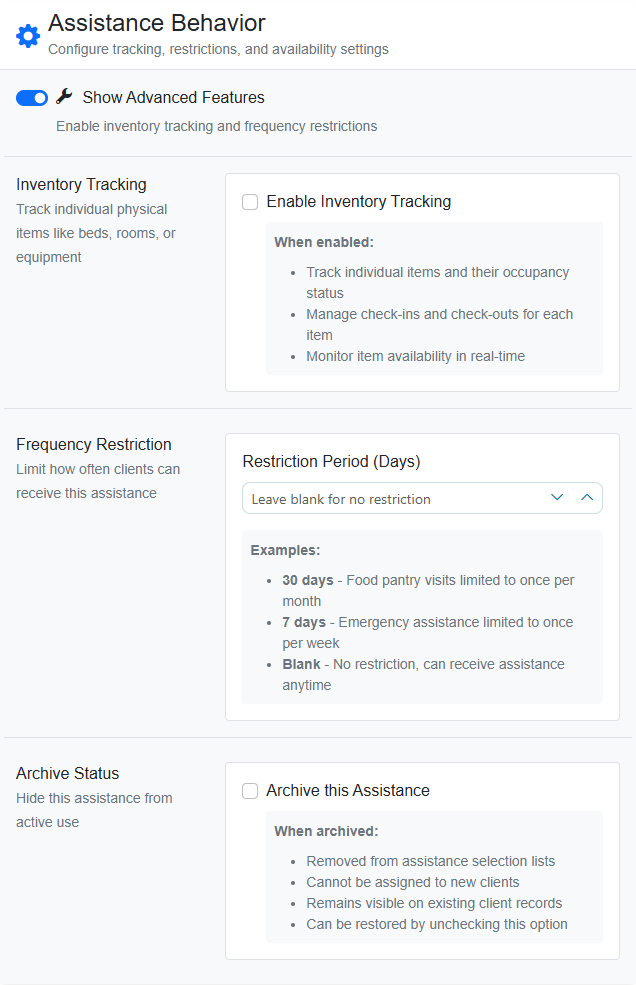
The screenshot above illustrates how modern platforms allow administrators to configure assistance settings with precision. This includes setting limits on service frequency, enabling inventory tracking, and automating enforcement of these rules. Features like these not only improve data integrity but also enhance the client experience by ensuring they receive the right services at the right time without administrative delays.
Automated Workflows and Reminders
Manual follow-ups are a common point of failure. Automation ensures that no client falls through the cracks. Smart workflows can automatically trigger actions based on specific conditions. For example, when a client first checks in, the system can automatically schedule a follow-up appointment, send a reminder email, or alert a caseworker to check in after a certain period. Some platforms even allow automated email and SMS communication, which can be critical for reaching clients who may not have regular access to email.
Platforms can support other automations, as well, such as auto-enrollment in services based on intake responses or triggering specific workflows when certain milestones are reached. Automations like these reduce the cognitive load on staff and ensure consistency in care.
Real-Time Dashboards and Impact Reporting
Leadership needs visibility without micromanagement. A good CMS provides customizable dashboards that display key metrics at a glance, such as clients served, services completed, and completion rates. These dashboards should update in real-time, allowing you to answer funder questions immediately rather than waiting for end-of-month reports.
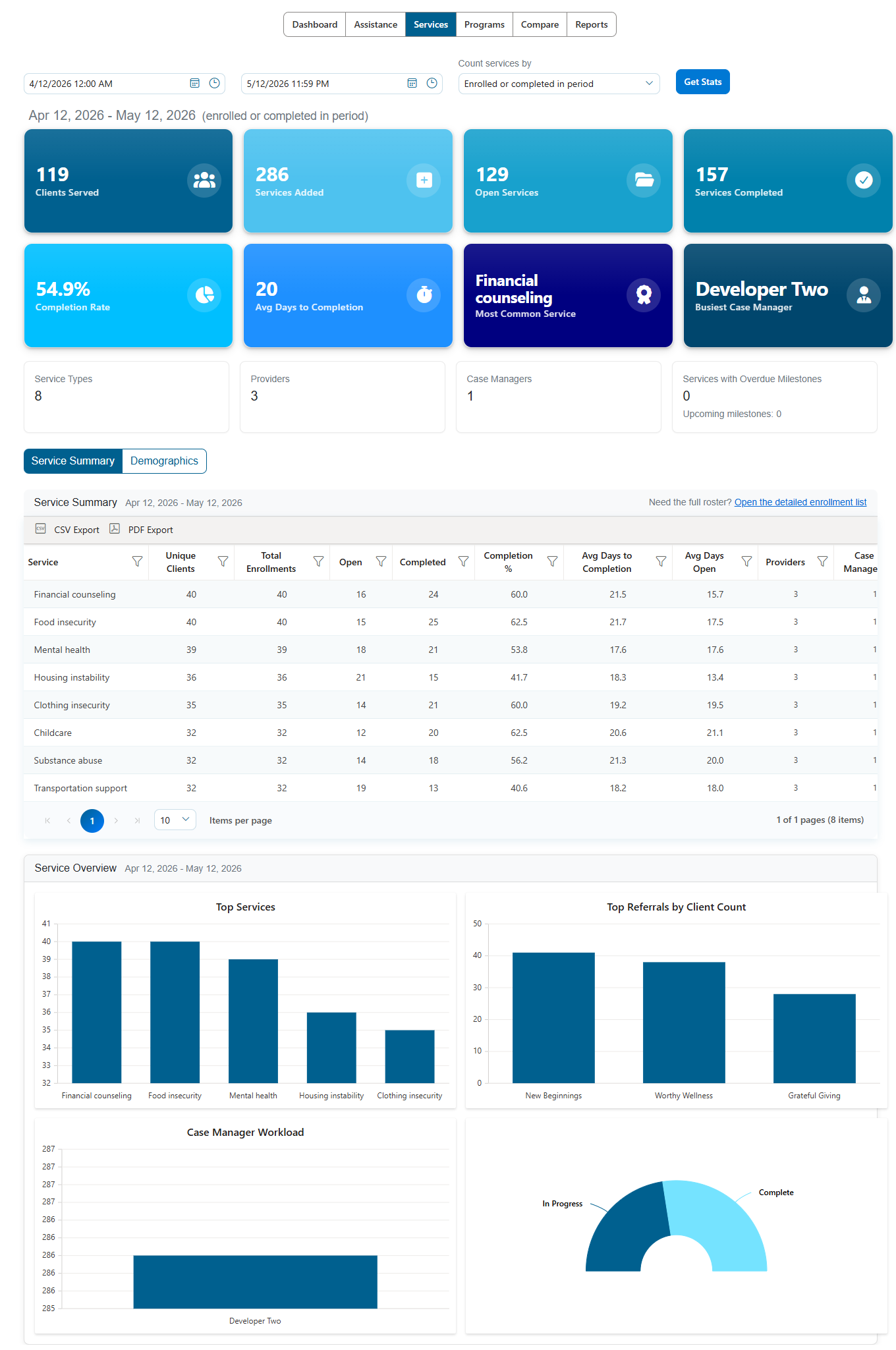
The dashboard above illustrates how modern platforms visualize service performance. It highlights critical metrics such as completion rates and average days to completion, allowing leadership to identify bottlenecks instantly. The ability to export this data directly to CSV or PDF streamlines the reporting process significantly.
Choosing the Right Platform for Your Team
Not all case management software is created equal. The best choice depends on your organization's size, complexity, and technical comfort level.
Simplicity vs. Feature Depth
There is a trade-off between simplicity and feature depth. Some platforms offer extensive customization but require a dedicated IT person to maintain them. Others are "refreshingly simple," designed for rapid adoption by non-technical staff. For many nonprofits, especially those with lean teams, simplicity is a feature, not a limitation. A tool that staff actually use effectively is better than a powerful tool that sits unused because it is too complex.
Mobile Accessibility
Frontline work often happens outside the office. Whether a caseworker is in the field, at a community center, or traveling between appointments, they need access to client records. Ensure the platform offers a robust mobile experience, whether through a responsive web interface or a dedicated app.
Scalability and Customization
Your software should grow with you. Consider whether the platform can handle increased client volume, additional service types, or new funding requirements. Also check for customization options. Can you create custom fields, forms, or reports without needing a developer? The ability to tailor the system to your specific workflows can save time and improve data quality.
Security and Compliance
Client data is sensitive. Ensure the platform complies with relevant data protection regulations (such as HIPAA or GDPR, depending on your region and services). Look for features like role-based access control, which ensures staff only see the information necessary for their role, and encrypted data storage.
How Cohoist Addresses Modern Nonprofit Needs
As you explore options, it is helpful to look at platforms built specifically for the realities of nonprofit case management. Cohoist, for example, positions itself around the idea of "refreshingly simple case management."
The platform is designed to reduce the friction between casework and impact. Instead of overwhelming staff with complex menus, Cohoist focuses on quick workflows. Caseworkers can log services, track milestones, and manage documents with minimal clicks. This speed of adoption means less training time and higher staff satisfaction.
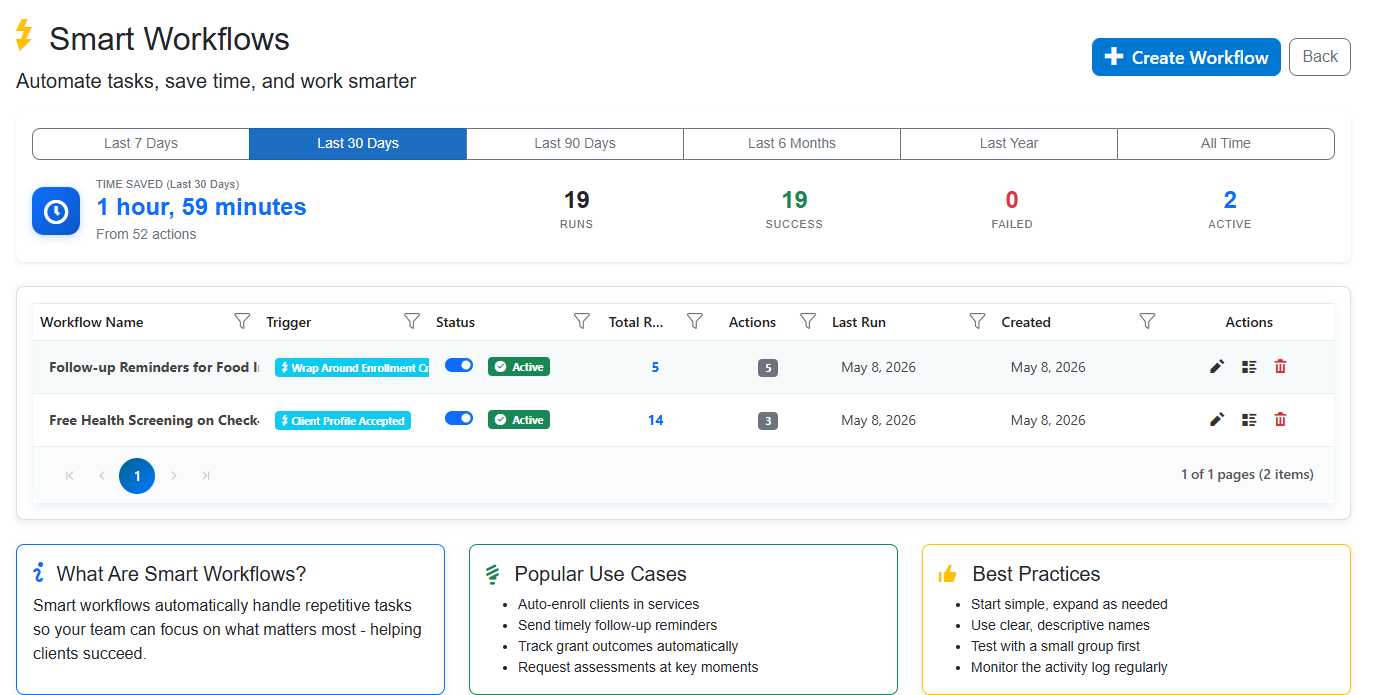
Automation is a key differentiator. As shown in the workflow dashboard above, Cohoist allows administrators to track time saved through automated tasks. This transparency helps leadership understand the ROI of the software. Smart workflows can handle routine follow-ups, auto-enrollments, and triggered communications, freeing staff to focus on high-touch client interactions.
Furthermore, Cohoist addresses the reporting challenge head-on. By connecting intake, service tracking, and outcomes in one system, it generates funder-ready reports automatically. The onboarding process is also streamlined, with clear guidance and progress trackers to help admins set up the platform quickly without technical expertise.
Steps to Implement Case Management Software Successfully
Adopting new software is a change management process. Even the best tool will fail if the implementation is poorly managed.
- Audit Your Current Workflow: Before buying software, map out your current client journey. Identify where the bottlenecks are. Is it slow intake? Lost documents? Manual reporting? Use this audit to define your must-have features.
- Involve Your Team: Include frontline staff in the selection process. They are the end-users and will provide critical feedback on usability. If they find the tool difficult, they will not use it.
- Plan for Data Migration: Moving data from spreadsheets or legacy systems can be daunting. Check if the new platform offers CSV import tools or migration support. Clean your data before importing to avoid bringing in errors.
- Train and Support: Provide comprehensive training. Use the platform's built-in tutorials, such as admin training videos, to guide new users. Assign a "champion" within your team to support colleagues during the transition.
- Iterate and Improve: Implementation is not a one-time event. Review your workflows after the first month. Are there features you are not using? Are there new automations that could help? Adjust the system based on real-world usage.
Conclusion
Case management software is no longer a luxury for large nonprofits; it is a necessity for any organization serious about impact and efficiency. In 2026, the tools that succeed are those that respect the time of frontline staff, provide clear visibility into outcomes, and simplify the complex journey from intake to impact.
By choosing a platform that prioritizes simplicity, automation, and real-time reporting, you can reduce administrative burden, improve client outcomes, and build stronger relationships with funders. The goal is not just to manage cases, but to empower your team to do their best work.
If you are ready to explore a case management solution that is built for the way nonprofits actually work, request a demo to see how Cohoist could simplify your workflow and accelerate your impact. Don't let outdated tools hold your team back. The right software can be a game-changer for your organization in 2026 and beyond.
Ready to put this into practice?
Cohoist gives your team clean intake, fast service tracking, and funder-ready reports — without the clutter of traditional systems. See how simple it can be.