Why Most Nonprofits Waste 20+ Hours a Week on Admin Instead of Mission Work
If you work in a nonprofit, you likely know the feeling. You start your day with a clear plan to help clients, but by noon, you are buried in spreadsheets, chasing down missing files, and manually compiling data for a grant deadline that is due tomorrow.
You did not join the social services sector to become a data entry clerk. Yet, for many organizations, the administrative burden of case management has become a significant barrier to delivering impact.
The problem is rarely a lack of dedication. It is usually a mismatch between your workflow and your tools. When software is clunky, unintuitive, or disconnected, staff spend hours on busywork that could be done in minutes. This "admin tax" drains morale, increases staff turnover, and ultimately reduces the time available for direct client care.
This article breaks down where these time leaks typically happen and how to plug them.
The Hidden Cost of Fragmented Systems
Many nonprofits rely on a patchwork of tools: a legacy CRM for donors, a separate spreadsheet for client tracking, and an email chain for internal communication. While this may have worked when the team was small, it creates friction as you scale.
The primary issue with fragmented systems is context switching. A case manager might spend 15 minutes looking up a client's history in one system, then another 15 minutes updating a status in another. Over a week, these micro-delays accumulate into hours.
Furthermore, data silos lead to errors. If client information lives in multiple places, updates in one location do not automatically reflect in others. This leads to duplicate records, outdated contact information, and the frustration of asking a client to repeat their story because the new intake form didn't sync with the existing file. Understanding how duplicate client records are wasting nonprofit time and money is the first step toward fixing these sync issues.
The "Spreadsheet Trap" and Its Impact on Staff Morale
Spreadsheets are often the first stop for nonprofits trying to organize data. They are free, flexible, and familiar. However, they are also the most dangerous tool for serious case management.
Spreadsheets lack structure. Without mandatory fields or validation rules, staff can accidentally delete critical data, enter inconsistent dates, or leave key notes blank. As the dataset grows, spreadsheets become slow and prone to crashing.
More importantly, spreadsheets do not tell a story. They are static rows of data. When leadership or funders ask for impact reports, someone must spend hours manually filtering, sorting, and formatting these sheets. This is not just inefficient; it is demoralizing for staff who feel their valuable casework is being reduced to manual labor. Recognizing the silent signs your nonprofit is losing impact because of manual client tracking can help you identify when it is time to move beyond spreadsheets.
How Intake Friction Slows Down Service Delivery
The intake process is the gateway to your mission. If it is difficult, clients may disengage before they even receive help.
Common intake pain points include:
- Paper-based forms: These must be manually typed into a system, creating a backlog and potential for transcription errors.
- Complex digital forms: If an online form is too long or confusing, potential clients abandon it.
- Duplicate creation: Without proper checks, the same client may be entered multiple times, fragmenting their service history.
A streamlined intake process should be fast, accurate, and client-friendly. It should capture essential data without overwhelming the user, and it should immediately feed that data into a centralized record that the entire team can access.
The Reporting Black Hole: From Data to Insights
One of the most time-consuming tasks for nonprofit leaders is reporting. Funders require specific metrics, and boards expect clear evidence of impact. Yet, many organizations still compile these reports manually at the end of each quarter.
This "reporting black hole" occurs because data is not structured for analysis. When you have to manually extract data from various sources to build a single dashboard, you are not just wasting time; you are delaying decision-making. Real-time insights allow you to adjust programs on the fly, but manual reporting only gives you a snapshot of the past. The hidden costs of scattered client data in growing nonprofit programs often manifest most clearly during these reporting periods.
Automating the Busywork: A Path to Efficiency
The solution is not to work harder; it is to automate the repetitive tasks that do not require human judgment.
Automation can handle:
- Follow-up reminders: Automatically notifying staff when a client hasn't been contacted in a set period.
- Service logging: Using quick workflows or barcode scanning to log assistance in seconds.
- Report generation: Automatically compiling data into funder-ready dashboards.
When you automate these tasks, you free up staff to focus on what they do best: building relationships with clients and solving complex problems.
Case Management That Respects Staff Time
Modern case management platforms are designed to reduce administrative friction. They prioritize speed of adoption, meaning staff can learn the system in days, not months. They offer a single view of the client, combining notes, documents, service history, and assessments in one place.
For example, a platform like Cohoist focuses on simplicity and clarity. It allows staff to track services quickly, manage client records centrally, and generate reports automatically. By removing the clutter of legacy systems, it helps teams move from intake to impact with less effort.
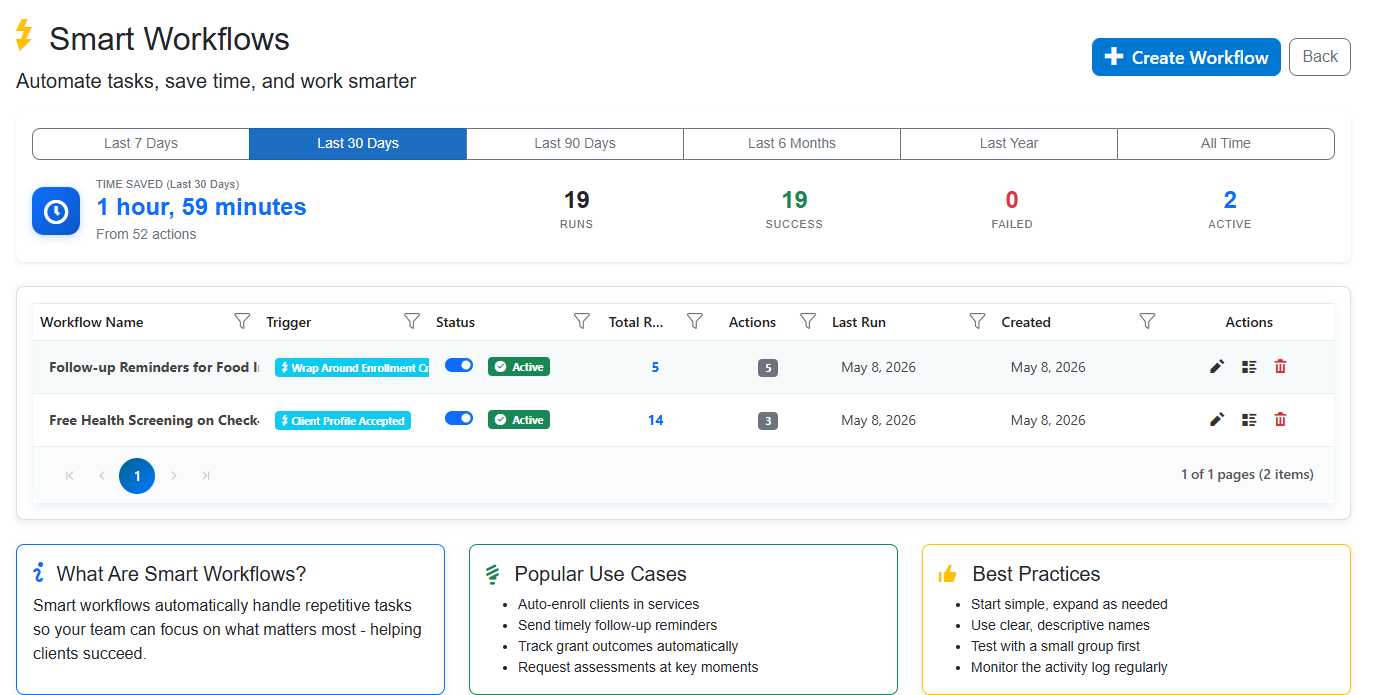
The image above shows a Smart Workflows dashboard. This view allows administrators to see exactly how much time is being saved by automated tasks. By tracking workflow runs and success rates, leaders can identify bottlenecks and ensure that automations are functioning correctly. This level of visibility turns abstract "time savings" into measurable operational efficiency.
Visualizing Impact for Funders and Leadership
Effective reporting is not just about compliance; it is about storytelling. When you can instantly visualize your impact, you can communicate your value more effectively to stakeholders.
Dashboards that display key metrics-such as unique clients assisted, total assistance provided, and outcome trends-help leadership make data-driven decisions. They also provide the evidence needed to secure continued funding.
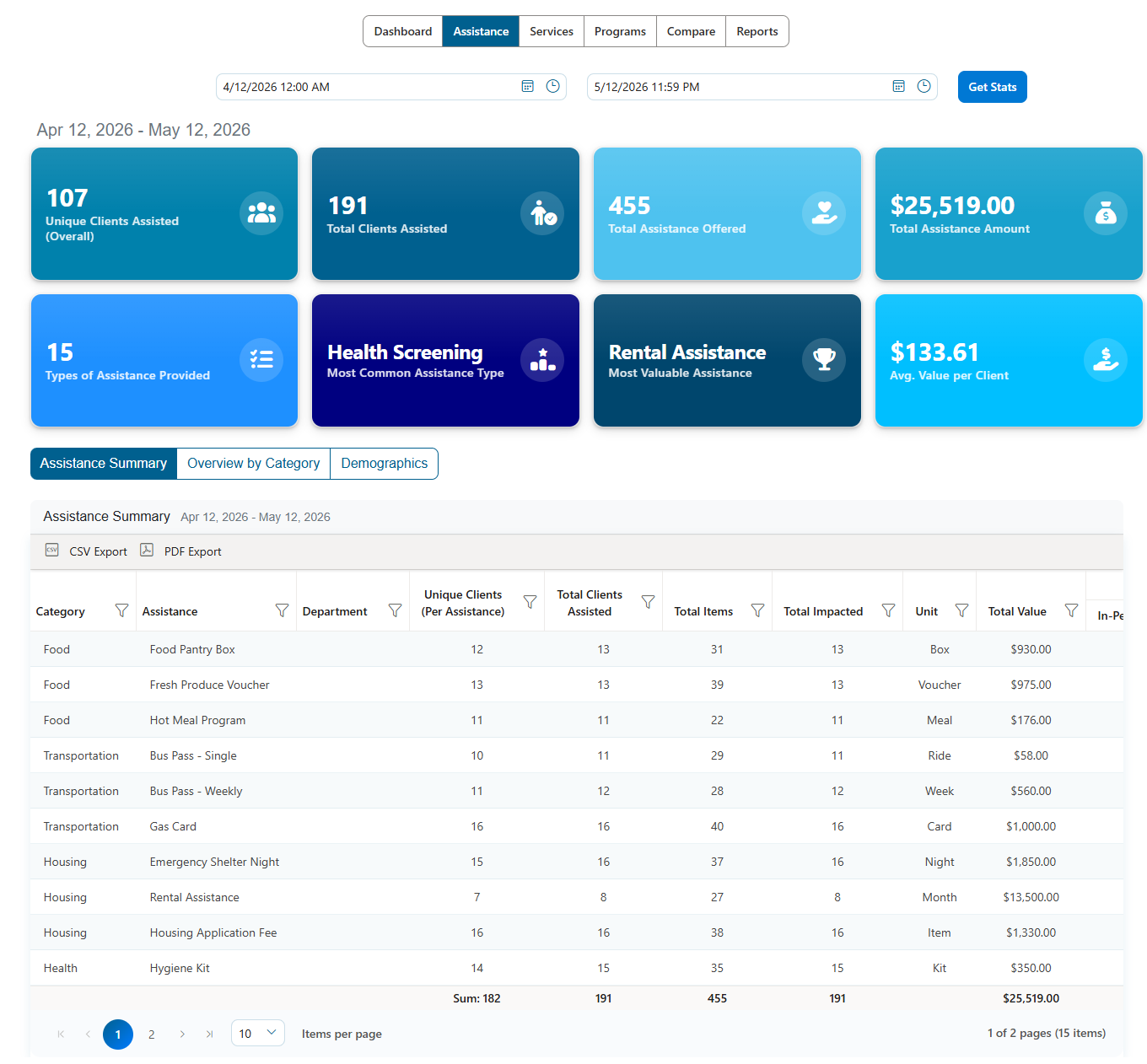
This Assistance Dashboard provides a high-level overview of program performance. It breaks down assistance by category, showing not just the volume of aid but its value. This kind of clear, visual data helps teams understand their reach and impact at a glance, rather than digging through rows of raw data.
Streamlining High-Volume Assistance
For programs that distribute significant resources, such as food pantries or emergency shelter, logging each transaction individually can be a major bottleneck.
Batch processing allows staff to enter assistance for multiple clients at once. This reduces the number of clicks and speeds up the service delivery process, allowing clients to receive help more quickly.
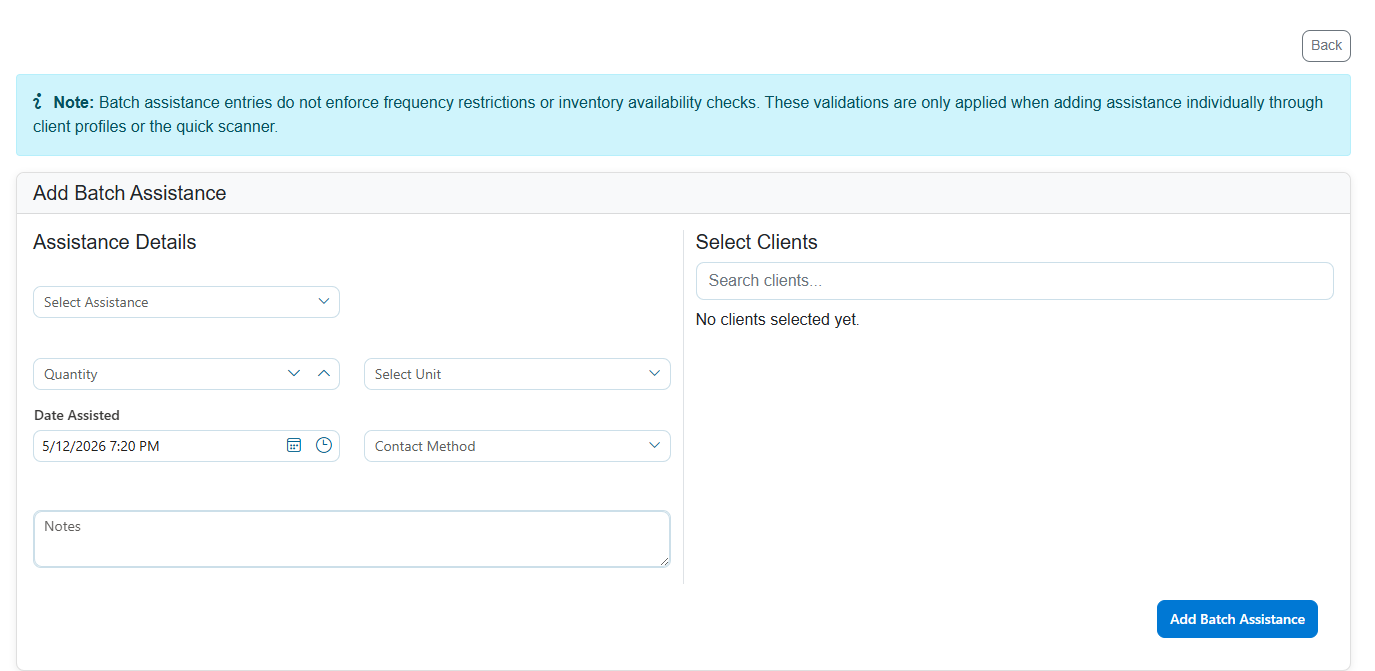
The Batch Assistance Entry Form shown here enables staff to select multiple clients and input assistance details in bulk. This feature is crucial for high-volume programs, as it dramatically reduces the administrative time required to log services, ensuring that more time is spent on direct client interaction.
Reclaiming Your Mission
The goal of any nonprofit is to serve its community. Every hour spent on inefficient admin is an hour taken away from that mission. By identifying where time is being wasted and implementing tools that streamline workflows, you can reduce administrative burden and increase impact.
It starts with recognizing that your staff's time is your most valuable resource. When you choose tools that are intuitive, automated, and designed for real-world nonprofit workflows, you empower your team to focus on what matters most: the people you serve.
If you are ready to reduce busywork and gain clearer visibility into your impact, explore how refreshingly simple case management can transform your operations. Start your free trial here to see how Cohoist can help you get back to your mission.
Ready to put this into practice?
Cohoist gives your team clean intake, fast service tracking, and funder-ready reports — without the clutter of traditional systems. See how simple it can be.