How Duplicate Client Records Are Wasting Nonprofit Time and Money (And How to Stop It)
If you work in direct client services, you know the feeling. A client walks into your office, or calls, or emails. Your staff member goes to look them up in your database. They type in a name. The system returns three different profiles for the same person.
One has the old phone number. One has the current address. One has a note from six months ago that contradicts the other.
Now, your caseworker has to manually merge these records, verify which information is correct, and update the client's file. That takes twenty minutes. If you have ten such cases a week, that is two hours of high-value staff time spent on data cleanup instead of client support.
This is not just an IT problem. It is an operational crisis. Duplicate records fragment the client story, lead to missed follow-ups, and create inaccurate reporting for funders.
In this guide, we will break down exactly how duplicates happen, why they cost your organization more than just time, and practical steps to stop them at the source.
The Hidden Costs of Fragmented Client Data
When a client has multiple profiles in your system, the impact ripples through your entire operation. It is rarely just about "clean data." It is about the quality of care and the efficiency of your team.
1. The "Blank Slate" Effect
When a caseworker cannot find the correct record, they often create a new one. This resets the client's history. Previous assessments, completed milestones, and past service notes disappear from immediate view. The new staff member has to start from scratch, potentially repeating assessments the client has already completed. This frustrates clients who feel like they are starting over every time they interact with your organization.
2. Inaccurate Impact Reporting
Funders and grantors require precise data on outcomes. If one client is counted as three separate individuals in your database, your intake numbers are inflated. If services are logged against the wrong profile, your outcome metrics (such as "clients housed" or "jobs secured") become unreliable. You risk reporting data that does not reflect reality, which can jeopardize future funding.
3. Staff Burnout and Low Adoption
Nonprofit staff are already stretched thin. When your case management tool is difficult to use or produces confusing results, adoption drops. Staff may start keeping notes in spreadsheets or notebooks because the database feels unreliable. This creates a shadow system that is impossible to report on and increases the administrative burden on leadership who must manually reconcile data.
Why Duplicates Happen (It Is Not Just Human Error)
It is easy to blame staff for entering data incorrectly, but the root cause is usually systemic. Duplicates occur because of friction in the intake and data entry process.
- Manual Entry Errors: A staff member hears "Smith" but types "Smyth." Or they enter a phone number with different formatting. Without automated validation, the system sees these as different people.
- Lack of Unique Identifiers: If your system relies solely on name and address matching, it is vulnerable to variations. A client moves, changes their name, or uses a different email address.
- Silos Between Departments: If your intake team uses one tool and your case management team uses another, data never syncs. The same person appears in both systems as a new entry.
- Complex Legacy Systems: Many traditional nonprofit CRMs are cluttered and slow. When data entry takes too many clicks, staff rush. Rushing leads to errors. Errors lead to duplicates.
The Intake Phase: Your First Line of Defense
The most effective way to stop duplicates is to prevent them at the point of entry. Intake is where the client record is born. If the birth is flawed, the entire lifecycle of that record is compromised.
1. Implement Smart Matching Algorithms
Modern case management platforms use algorithms to compare incoming data against existing records in real-time. These algorithms look beyond exact matches. They consider:
- Name variations (nicknames, typos)
- Date of birth
- Phone numbers and email addresses
- Address history
When a new intake form is submitted, the system should instantly flag potential matches. This allows the intake specialist to see if the person already exists before creating a new profile.
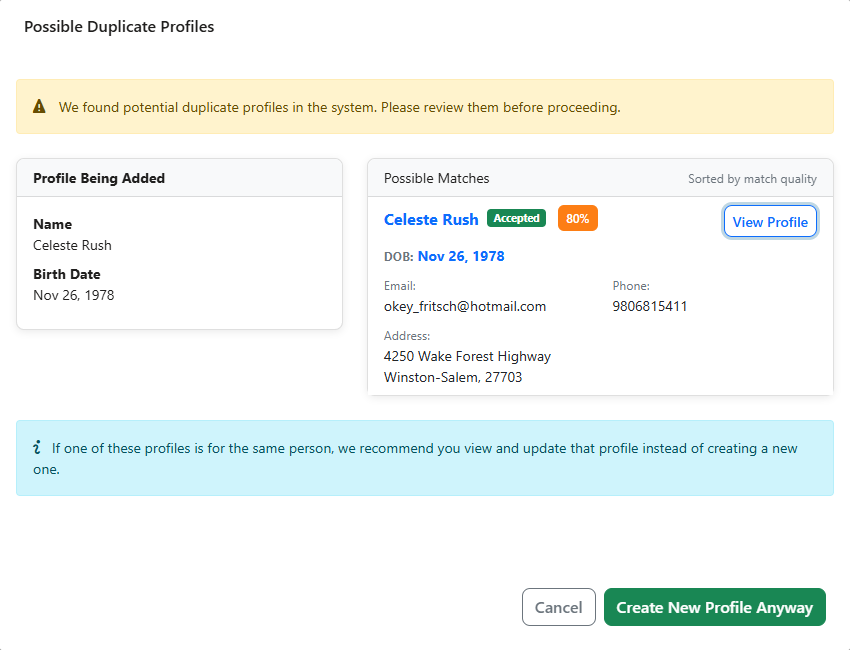
As shown in the interface above, a modern system can present a clear warning when a potential duplicate is detected. It displays a side-by-side comparison of the new profile and existing matches, often including a confidence score. This empowers staff to make an informed decision: update the existing record or create a new one. This simple step prevents the majority of duplicate records from ever entering your database.
2. Standardize Data Entry with Custom Forms
Free-text fields are the enemy of data integrity. When staff can type anything, you get everything. Use custom intake forms that restrict input where possible.
- Use dropdown menus for states, countries, and service types.
- Use date pickers for birth dates.
- Use phone number fields that enforce format.
Standardization makes it easier for matching algorithms to work and reduces the cognitive load on staff during intake.
3. Require Unique Client IDs
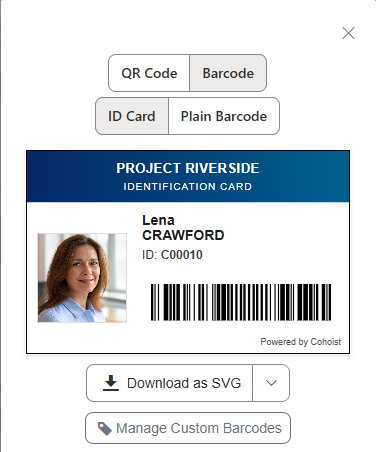
Assign a unique identifier to every client upon their first interaction. Better yet, consider printing an ID card for each client. This ID should remain with them throughout their journey with your organization. It serves as the primary key for all records, ensuring that even if names or addresses change, the system knows it is the same person.
Many platforms automatically create these unique identifiers for your clients upon intake, and a few even create the ID cards, as well, so you can download and print them right away:
Managing Existing Duplicates: The Cleanup Process
Even with the best prevention, you likely have some duplicates already. Cleaning them up is essential for accurate reporting and efficient operations.
1. Identify Duplicates Proactively
Do not wait for staff to complain. Use your system's reporting tools to identify potential duplicates regularly. Look for:
- Records with the same name and date of birth.
- Records with the same phone number or email address.
- Records created within a short timeframe for the same address.
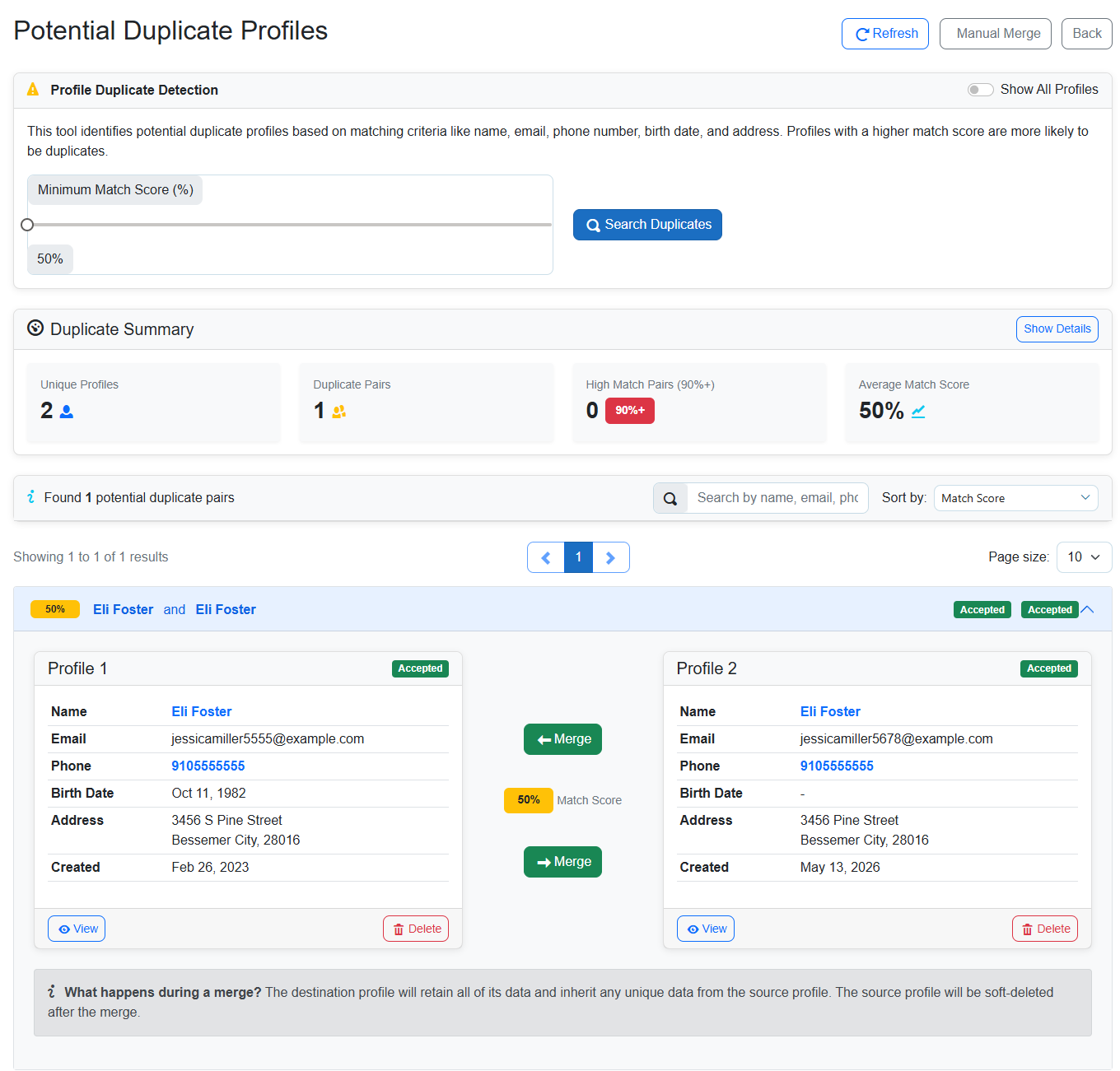
A dedicated duplicate detection tool, as seen here, allows you to scan your entire database. It provides a summary of duplicate pairs and match scores. This gives leadership visibility into data health and helps prioritize which records need immediate attention. You can set a minimum match score threshold to filter out low-probability matches and focus on high-confidence duplicates.
2. Merge with Precision
Once duplicates are identified, they must be merged. This is not just about deleting one record. It is about consolidating the best information from both profiles into a single, accurate record.
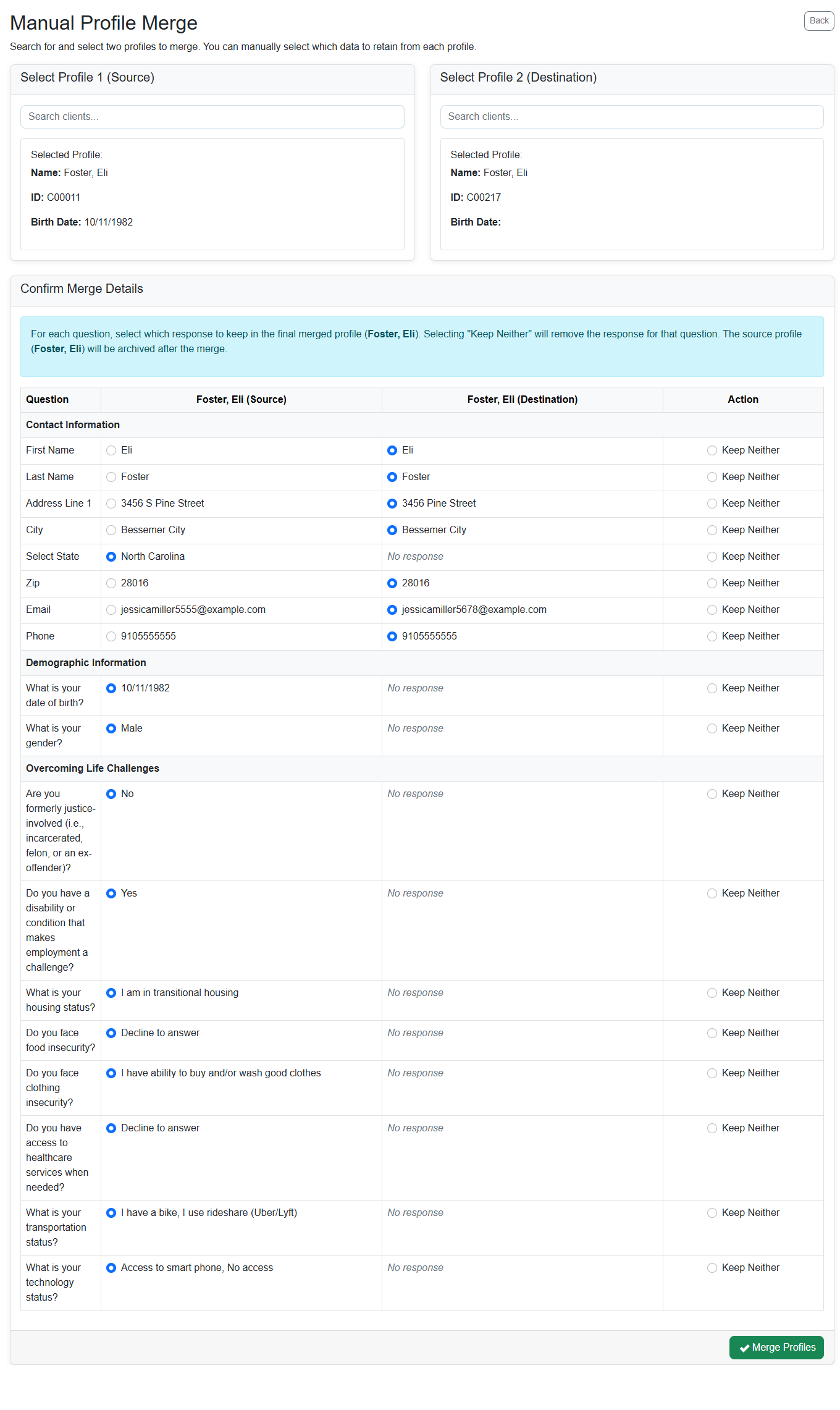
A robust merge tool allows case managers to compare fields side-by-side. You can choose which information to keep from the source and destination profiles. This ensures that no critical data, such as a recent service note or a specific housing status, is lost in the process. The goal is to create a single, comprehensive client story that reflects the full history of the individual.
3. Establish a Data Governance Policy
Cleaning up duplicates is a one-time fix. Preventing them is an ongoing process. Establish a data governance policy that defines:
- Who is responsible for data entry and quality.
- How often duplicate scans should be run.
- The protocol for merging records.
- Training requirements for new staff on data entry best practices.
Building a Culture of Data Quality
Technology alone cannot solve the duplicate records problem. It requires a shift in how your team views data.
1. Educate Staff on the "Why"
Frontline staff are often focused on client care, not database hygiene. Help them understand how clean data helps them do their jobs better. Show them that fewer duplicates mean less time searching for records, more time with clients, and easier reporting. When staff see the benefit, they are more likely to follow data entry protocols.
2. Choose Tools That Reduce Friction
If your current system is slow, clunky, or confusing, staff will find ways around it. Look for case management platforms that prioritize user experience. A system that is quick to use, intuitive, and helpful will naturally lead to better data quality.
For example, platforms like Cohoist are designed with simplicity in mind. They focus on reducing busywork and providing a clear path from intake to impact. By making data entry fast and intuitive, they reduce the likelihood of errors and duplicates. The built-in duplicate detection and merge tools further support staff in maintaining data integrity without requiring technical expertise.
3. Regular Audits and Feedback Loops
Schedule regular data audits. Review a sample of client records for accuracy. Share feedback with staff on common errors and celebrate improvements. Create a feedback loop where staff can report issues with the system that lead to data problems. This continuous improvement cycle ensures that your data remains clean and reliable over time.
Conclusion
Duplicate client records are more than a data annoyance. They are a significant drain on your nonprofit's time, money, and effectiveness. They fragment the client story, skew your reporting, and frustrate your staff.
However, the solution is not just technical. It is a combination of smart prevention at intake, proactive management of existing data, and a culture that values data quality. By implementing smart matching, standardizing entry, and choosing user-friendly tools, you can eliminate duplicates and free your team to focus on what matters most: serving your clients.
If you are ready to stop wasting time on duplicate records and start building a cleaner, more efficient case management system, explore how Cohoist can help your team work smarter. You can start a free trial today to see how simple it is to maintain data integrity. Start your free trial here.
Ready to put this into practice?
Cohoist gives your team clean intake, fast service tracking, and funder-ready reports — without the clutter of traditional systems. See how simple it can be.